Does your AI agent have access to your WooCommerce search and facets?
Give your agent access to what WPXFacets has indexed, so it can investigate your product filters with evidence from your store.

Give your agent something concrete to inspect
A product has a colour in WooCommerce, but you are unsure whether that value reached the filtering index. Your agent can explain what to check. Can it inspect the indexed product and its configured facet fields?
With the connection, you can ask whether a product is indexed, which values its configured facets contain, or which catalogue attributes deserve attention. The agent can request those facts directly instead of asking you to collect and paste them from several screens.
The focus here is product and facet investigation. Synonym deployment information adds search-related context; diagnosing an exact text query requires a separate check. For a search-matching example, see Herrenschuhe and Schuhe.
The 60-second version
- Inspect a product’s presence and configured facet values in the index.
- Compare the reported configuration with what you expect from your store.
- Review possible facets using attribute coverage and distinct-value counts.
- Check synonym deployment status and consult WPXFacets guidance.
Ask the agent to show its evidence and suggest the next check. You control any changes.
Why the index matters
A product’s WordPress record tells you what WooCommerce stores. A filtering investigation also needs to establish what reached the index and which fields WPXFacets has published as facet configuration.
A value in wp-admin does not, by itself, prove that the same value is available to the indexed filtering system. Comparing these views helps you decide whether to investigate the product data, indexing or configuration publication.
WPXFacets already manages this index and facet configuration. Its MCP connection gives your agent a supported way to inspect selected facts from that layer. MCP is the protocol through which the agent requests information: you ask in ordinary language, and it chooses an available tool and explains the results.
Could the agent just browse the storefront?
A browser can open filters and observe the displayed products. That checks the shopper’s experience. The rendered page alone does not establish which values are stored in the index or whether the published facet configuration matches wp-admin. MCP supplies evidence for those questions; storefront tests verify the actual result a shopper sees.
Facets in admin. Missing from the published configuration.
During checks on our demo catalogue, MCP found the selected product in the index but returned no configured facet fields. Yet ten filter controls existed in WordPress admin.
That discrepancy gave us a specific next check: had the configuration been published correctly?
Independent WordPress checks found a publication-status mismatch that caused the metadata publisher to skip the definitions. After correcting it and republishing the configuration, MCP exposed nine supported facet definitions and nine field projections for the product. The Search control is excluded from that projection.
No product reindex was needed. The product count and index identity stayed unchanged.
MCP exposed the empty field projection; independent checks established the cause. This was a defect in our demo’s configuration publication, not proof of a storefront filtering failure. The useful decision was to investigate the missing configuration before rebuilding the product index.
Indexed, but out of stock
In a separate demo check, a product was present in the index with its stock flag set to false. It did not satisfy a positive in-stock condition. We independently confirmed the same state in WooCommerce.
That was a consistency check, not a stock discrepancy: it ruled out treating the product as absent from the index. Neither example involved an exact storefront query or an automatic repair through MCP.
Use the same context to review your facets
Catalogue coverage and distinct-value counts help the agent explain which attributes deserve attention. Many distinct prices can suit a range control. Sparse ratings suggest checking review coverage. One current category can be intentional when more are planned.
In our demo, we explicitly wanted to keep Category and Rating as the catalogue grows. That instruction belongs in the question: coverage alone cannot decide your merchandising strategy.
In two fresh-session pairs, the agent without the connection requested catalogue evidence before recommending changes. With the connection, it used the available aggregates to identify concrete attributes to investigate while preserving those controls.
The illustration below shows how catalogue facts and merchant intent can inform a conversation. It is not a transcript of those paired sessions.
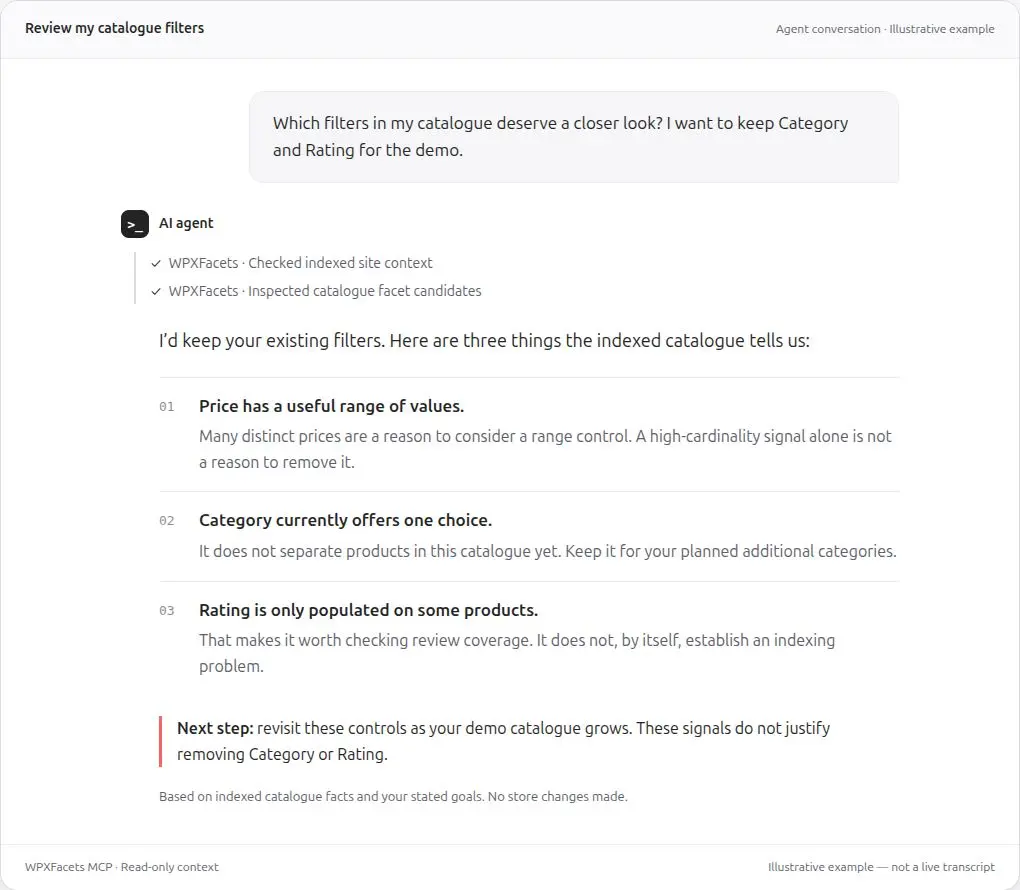
Which catalogue fact supports this recommendation? Ask that before changing a facet. A useful proposal tells you what was observed, why it matters and what still needs checking.
Five tools, in everyday questions
| What you ask | What the agent can inspect | What still needs another check |
|---|---|---|
| What does WPXFacets report about my site? | Supported configuration, index condition, freshness and warnings | Search quality and the exact last-indexed time of a product |
| Which attributes deserve a facet review? | Evaluated fields, configured state, coverage, distinct counts and bounded top values | Shopper demand and values omitted from a shortened response |
| Is this product indexed? | Presence and configured facet values for one product ID you supply | Live WooCommerce values, complete variation rows and storefront matching |
| Has my synonym configuration been deployed? | Enablement, deployment state, rule counts and available revision/time information | Individual synonym terms and actual query matching |
| What does the documentation say? | Available guidance with version selection and coverage warnings | Topics or versions outside the available corpus |
For technical readers, these are get_site_context, get_catalog_facet_candidates, inspect_indexed_product, inspect_synonyms and search_xfacets_docs.
Questions you can copy
Replace PRODUCT_ID with a product from the connected store. These are starting prompts, not recorded responses.
- “Is product PRODUCT_ID present in the index? Show its configured facet values and identify any missing fields.”
- “What stock flag is indexed for product PRODUCT_ID, and does it satisfy a product-level in-stock condition?”
- “Review my configured facets using coverage and distinct-value counts. Which three fields deserve investigation, and why? Keep Category and Rating for planned catalogue changes.”
- “Which evaluated attributes could be useful facets? Show the evidence and tell me if the returned list is incomplete.”
- “What does the site context report about configuration freshness and index condition? Identify anything it cannot establish.”
- “Is my synonym configuration deployed? Compare the configured and deployed rule counts and explain any warnings.”
- “Find WPXFacets guidance on range versus list facets. Tell me which documentation version you used and whether coverage is partial.”
After a synonym change, deployment evidence is a useful first check. Verifying that Schuhe actually finds Herrenschuhe still requires a search-matching test; a deployment count cannot settle it.
Access and data: what you are connecting
You authorize access through your WPXFacets account. Each connection is bound to one client, your account and one eligible Main site. The agent cannot select another store by changing a tool argument.
Supported results go to the AI client you authorize. They can include indexed product facet values, catalogue aggregates, configuration information and documentation excerpts. Read-only access still shares information with that client, so review its data-handling settings and policies.
The interface does not provide a full catalogue export, arbitrary WordPress database access, orders or customer records. Raw Elasticsearch documents, gateway credentials and synonym terms are outside its returned data.
You can manage and revoke the connection in your WPXFacets account. Revocation stops future authorized reads; it does not erase information already received by the AI client. See our Privacy page and Subprocessors page alongside your AI provider’s policies.
What phase 1 can settle
The pilot provides inspection and evidence for a decision. It does not edit products, change facets, deploy synonyms or execute searches. Exact text-query diagnosis and write operations are outside this phase.
Two boundaries matter when reading an answer:
- Product values do not describe every variation. Separate attribute and price lists do not establish which price belongs to which variation. A product-level stock flag does not confirm every size or colour is available.
- An incomplete answer should say what is missing. If current evidence is unavailable, the agent should say so. A value missing from a shortened list is not proof that it is absent from your catalogue.
Start with a question about your own catalogue
The pilot fits merchants and agencies who already use an agent and need indexed evidence to investigate a product, compare configuration or review facets. Bring one decision and ask which facts support the answer.
If you only need general advice or have already supplied the relevant facts, that may be enough. If you need automatic changes or an explanation of one exact search result, this interface does not yet cover that task.
The private pilot is for eligible Main sites with active managed Elasticsearch. Contact us with your catalogue question and preferred AI client so we can confirm compatibility for your setup.
Ask about the private pilotAbout the examples
The demo checks and catalogue-review sessions took place in September 2026. The discrepancy and stock examples are summaries of verified checks; WordPress verification was independent of MCP.
The catalogue comparison used four fresh ChatGPT sessions, two with the connection and two without, reversing the order for the second pair. The merchant question and visible reasoning setting were held constant; the exact model identity was not exposed. This small qualitative demonstration establishes neither time savings, ranking improvements nor conversion gains.